 code前端网
Flutter监控滚动控制和实际appBar滚动渐变
Flutter中的滚动监控一般可以通过两种方式实现,即ScrollController和NotificationListener。
ScrollController介绍
scrollController
介绍ScrollController的常用属性和方法:
offset:可滚动组件当前的滚动位置。jumpTo(双偏移)跳转到指定位置,offset为滚动偏移。animateTo(double offset,duration,curvecurve)与jumpTo(double offset)相同,不同之处在于animateTo在跳跃时执行动画,您必须运行执行动画所需的时间和动画曲线。
ScrollPosition
ScrollPosition 用于存储可滚动组件的滚动位置。 ScrollController 对象可由多个可滚动组件使用。
ScrollController 为每个滚动组件创建一个 ScrollPosition 对象来存储位置信息。 ScrollPosition 存储在 ScrollController 的定位属性中。它是一个 List 数组。 ScrollPosition 是 ScrollController 中实际存储位置信息的地方,而 offset 只是一个有用的属性。如果你查看源代码,你会发现偏移量是从 ScrollPosition 获取的。
  /// Returns the attached [ScrollPosition], from which the actual scroll offset
  /// of the [ScrollView] can be obtained.
  /// Calling this is only valid when only a single position is attached.
  ScrollPosition get position {
    assert(_positions.isNotEmpty, 'ScrollController not attached to any scroll views.');
    assert(_positions.length == 1, 'ScrollController attached to multiple scroll views.');
    return _positions.single;
  }

  /// The current scroll offset of the scrollable widget.
  /// Requires the controller to be controlling exactly one scrollable widget.
  double get offset => position.pixels;
复制代码
A ScrollController虽然可以对应多个可滚动组件,但读取滚动位置需要offset一对一读取。在一对多的情况下,我们可以使用其他方法来读取滚动位置。现在假设一个 ScrollController 对应两个可滚动组件,那么可以通过 position.elementAt(index) 得到 ScrollPosition,从而得到 补偿:
controller.positions.elementAt(0).pixels
controller.positions.elementAt(1).pixels
复制代码
ScrollPosition方法
ScrollPosition常用的方法有两种:animateTo()和jumpTo(),他们才是真正的掌控者有 about 跳转到滑块位置的方法。 ScrollController中这两个同名的方法最终会在内部调用ScrollPosition的两个方法。
  Future<void> animateTo(
    double offset, {
    @required Duration duration,
    @required Curve curve,
  }) {
    assert(_positions.isNotEmpty, 'ScrollController not attached to any scroll views.');
    final List<Future<void>> animations = List<Future<void>>(_positions.length);
    for (int i = 0; i < _positions.length; i += 1)
      // 调用 ScrollPosition 中的 animateTo 方法
      animations[i] = _positions[i].animateTo(offset, duration: duration, curve: curve);
    return Future.wait<void>(animations).then<void>((List<void> _) => null);
  }
复制代码
ScrollController 控制原理
ScrollController 还有三个重要的方法:
createScrollPosition:当ScrollController如果与可滚动组件关联时,首先是可滚动组件 The调用方法ScrollController的createScrollPosition来创建一个ScrollPosition来存储滚动位置信息。
ScrollPosition createScrollPosition(
    ScrollPhysics physics,
    ScrollContext context,
    ScrollPosition oldPosition);
复制代码- 滚动组件调用
createScrollPosition方法后,调用attach方法获取要添加的创建编号的ScrollPosition信息位置在属性中,这一步称为“注册位置”。注册后才能调用animateTo()和jumpTo()。
void attach(ScrollPosition position);
复制代码- 最后,当可滚动组件被销毁时,会调用方法
detach(),从ScrollController转移对象ScrollPosition位置从属性中删除。此步骤称为“注销位置”。退出后,animateTo()和jumpTo()不再被调用。
void detach(ScrollPosition position);
复制代码
介绍NotificationListener
气泡通知
Flutter Widget 树中的子 Widget 可以通过发送通知(Notification)与父 Widget(包括祖先 Widget)进行通信,父组件可以通过NotificationListener 用于监听其关心的通知的组件。这种通信方式类似于Web开发中的浏览器冒泡。 Flutter 中使用术语“冒泡”,称为 通知气泡
通知气泡 气泡与用户触摸事件气泡类似,但有一个区别:通知气泡可以中止,但用户触摸事件气泡则不能。
u Flutter 使用通知中很多地方的持续通知,比如scrollble widgets,分发 滚动通知(ScrollNotification)和 其中, ScrollUpdateNotification都继承自类 目前, 首先,两种方法都可以控制滚动,但还是有一些区别: 有关完整代码,请参阅下面 GitHub 项目中的文件 完整代码请参见下面 GitHub 项目中的文件 作者:小风臧月ScrollLLL 通过监听来确定滚动条的位置 滚动通知。 switch (notification.runtimeType){
case ScrollStartNotification: print("开始滚动"); break;
case ScrollUpdateNotification: print("正在滚动"); break;
case ScrollEndNotification: print("滚动停止"); break;
case OverscrollNotification: print("滚动到边界"); break;
}
复制代码ScrollStartNotification和 _controller.animateTo(0.0, duration: Duration(milliseconds: 500), curve: Curves.ease);
复制代码ScrollNotification。不同类型的通知子类将包含不同的信息。 ScrollUpdateNotification有属性scrollDelta,记录了移动的情况。当NotificationListener继承了StatelessWidget类时,我们可以直接将其放在widget编号中,并通过其中的onNotification指定一个模板参数。该类型必须取自通知。例如,当可以显式指定模板参数时,通知类型为滚动结束通知: NotificationListener<ScrollEndNotification>
复制代码NotificationListener仅接收此参数类型。通知。onNotification回调是通知处理回调,返回值为布尔类型(bool)。当返回值为true时,阻止冒泡,父Widget无法再收集。关于通知;当返回值为false时,消息不断冒泡。 两者的区别
ScrollController可以控制滚动控件的滚动,而NotificationListener 是不允许的。 NotificationListener,您可以侦听从可滚动组件到小部件树根的任何位置,而ScrollController只能与特定的可滚动组件关联。 NotificationListener收到滚动事件后,通知会包含一些有关当前滚动位置和ViewPort的信息,而ScrollController只能获取当前滚动位置。 ScrollController实例
渲染
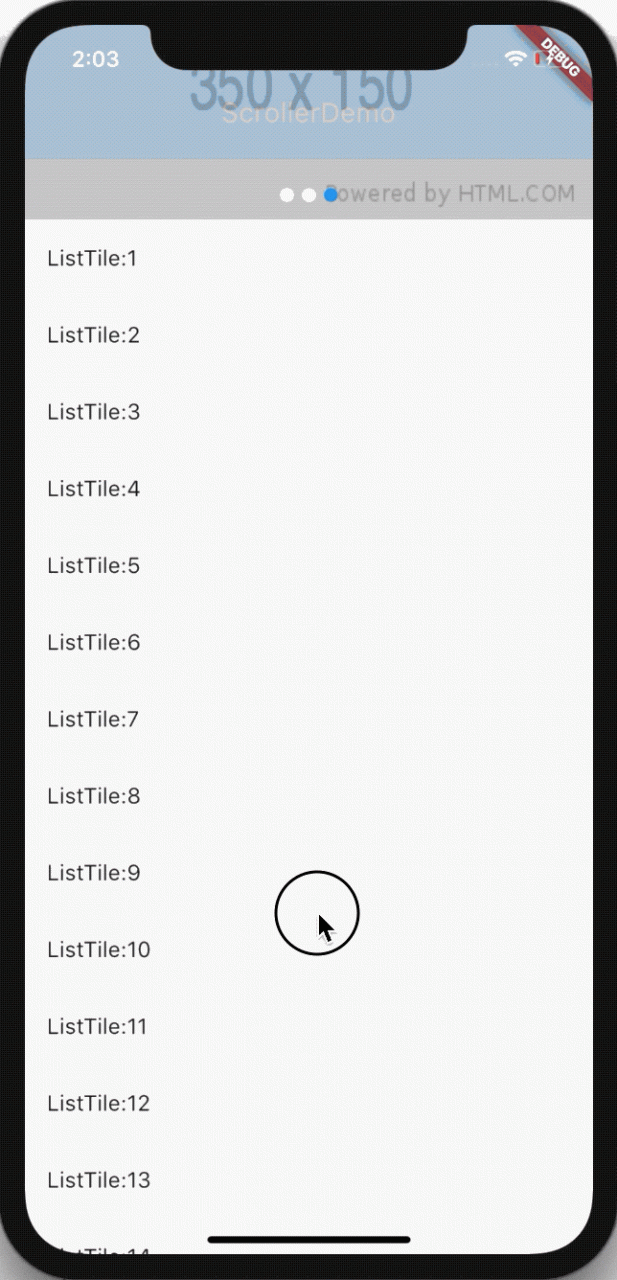
代码实现步骤
Scaffolding组件body A 内 堆叠 的级联小部件,其中放置了 列表视图 和自定义 appBar; floatingActionButton 放置一个浮动按钮以返回顶部。Scaffold(
body: Stack(
children: <Widget>[
MediaQuery.removePadding(
removeTop: true,
context: context,
child: ListView.builder(
// ScrollController 关联滚动组件
controller: _controller,
itemCount: 100,
itemBuilder: (context, index) {
if (index == 0) {
return Container(
height: 200,
child: Swiper(
itemBuilder: (BuildContext context, int index) {
return new Image.network(
"http://via.placeholder.com/350x150",
fit: BoxFit.fill,
);
},
itemCount: 3,
autoplay: true,
pagination: new SwiperPagination(),
),
);
}
return ListTile(
title: Text("ListTile:$index"),
);
},
),
),
Opacity(
opacity: toolbarOpacity,
child: Container(
height: 98,
color: Colors.blue,
child: Padding(
padding: const EdgeInsets.only(top: 30.0),
child: Center(
child: Text(
"ScrollerDemo",
style: TextStyle(color: Colors.white, fontSize: 20.0),
),
),
),
),
)
],
),
floatingActionButton: !showToTopBtn
? null
: FloatingActionButton(
child: Icon(Icons.keyboard_arrow_up),
onPressed: () {
_controller.animateTo(0.0, duration: Duration(milliseconds: 500), curve: Curves.ease);
},
),
)
复制代码scrollController对象,初始化时添加对滚动的监听,并关联到ListView可滚动小部件:ScrollController _controller = new ScrollController();
@override
void initState() {
_controller.addListener(() {
print(_controller.offset); //打印滚动位置
})
}
复制代码 double t = _controller.offset / DEFAULT_SCROLLER;
if (t < 0.0) {
t = 0.0;
} else if (t > 1.0) {
t = 1.0;
}
setState(() {
toolbarOpacity = t;
});
复制代码floatingActionButton的实际状态,并确定floatingActionButton是否必须显示。 :if(_controller.offset < DEFAULT_SHOW_TOP_BTN && showToTopBtn){
setState(() {
showToTopBtn = false;
});
}else if(_controller.offset >= DEFAULT_SHOW_TOP_BTN && !showToTopBtn){
setState(() {
showToTopBtn = true;
});
}
复制代码floatingActionButton返回顶部: _controller.animateTo(0.0, duration: Duration(milliseconds: 500), curve: Curves.ease);
复制代码/demo/scroller_demo.dart。 ?偏移量:if (notification is ScrollUpdateNotification && notification.depth == 0) {
double t = notification.metrics.pixels / DEFAULT_SCROLLER;
if (t < 0.0) {
t = 0.0;
} else if (t > 1.0) {
t = 1.0;
}
setState(() {
toolbarOpacity = t;
});
print(notification.metrics.pixels); //打印滚动位置
}
复制代码/demo/notification_listener_demo.dart。
链接:https://juejin.im/post/5d8f0ad6e51d45780f0604c8
来源:掘金
版权归作者所有。商业转载请联系作者获得许可。非商业转载请注明出处。
版权声明
本文仅代表作者观点,不代表Code前端网立场。
本文系作者Code前端网发表,如需转载,请注明页面地址。


