 code前端网
nginx优化中钉子算法tcp_nodelay需要设置的参数
1.知识准备
● nginx优化中经常需要设置一个参数,tcp_nodelay就是参数●❝形成小包。大数据包,提高带宽利用率,这就是著名的钉子算法
● 在tcp协议中,有一个现象:应用层数据可以很低(比如1字节),而传输层开销为40字节(20 字部分 IP 标头 + 20 字节 TCP 标头)。这种情况下,传输的大部分都是控制报文,不仅增加了带宽消耗,而且带宽利用率不高
● Nagle 算法必须解决这个问题。在发送的数据被确认之前,或者在收到对端的确认之前,不得发送新生成的小数据包。它必须完成一个 MSS 或等到收到确认后再发送,直到超时。
2。准备环境
| OS | Ubuntu 18.04.1 LTS |
| docker | 18.06.0-ce |
客户端:
服务器:
服务器:
开启美甲算法
,首先准备一个nginx配置文件并开启钉钉算法,将tcp_nodelay设置为off;
root@k8s-node2:/tmp# more nginx.conf
user  nginx;
worker_processes  1;

error_log  /var/log/nginx/error.log warn;
pid        /var/run/nginx.pid;


events {
    worker_connections  1024;
}


http {
    include       /etc/nginx/mime.types;
    default_type  application/octet-stream;

    log_format  main  '$remote_addr - $remote_user [$time_local] "$request" '
                      '$status $body_bytes_sent "$http_referer" '
                      '"$http_user_agent" "$http_x_forwarded_for"';

    access_log  /var/log/nginx/access.log  main;

    sendfile        on;
    tcp_nodelay off;

    keepalive_timeout  65;

    include /etc/nginx/conf.d/*.conf;
}
启动容器
root@k8s-node2:/tmp# docker run -d --name nginx_delay -v /tmp/nginx.conf:/etc/nginx/nginx.conf -p 80:80 nginx:latest
6b7d5a5d3c3ed021fed6847d138837754c5732979d1c829ec62107ec80440db8
root@k8s-node2:/tmp# docker ps | grep nginx_delay
6b7d5a5d3c3e        nginx:latest                                                        "nginx -g 'daemon of…"   7 seconds ago       Up 6 seconds        0.0.0.0:80->80/tcp   nginx_delay
首先使用 tcpdump 捕获本机 80 端口的流量:
root@k8s-node2:/tmp# tcpdump -i ens3 port 80 -afexnnvv -w nginx_ab.cap现在使用 ab 压测工具增大端口的容积
注意:必须使用-k参数,并使用keepalive模式来模拟钉子算法
root@k8s-node2:~# ab -n 1000 -c 100 -k http://127.0.0.1/
This is ApacheBench, Version 2.3 <$Revision: 1807734 $>
Copyright 1996 Adam Twiss, Zeus Technology Ltd, http://www.zeustech.net/
Licensed to The Apache Software Foundation, http://www.apache.org/

...
Time per request:       44.619 [ms] (mean)
...过滤大量信息,我们得出这个指标Time per请求无论怎么测试,平均延迟始终在40ms左右
我们看一下抓包信息,用wireshark打开
在大量的数据包中,我们首先处理数据包并选择查看随机,选择syn对应的tcp流
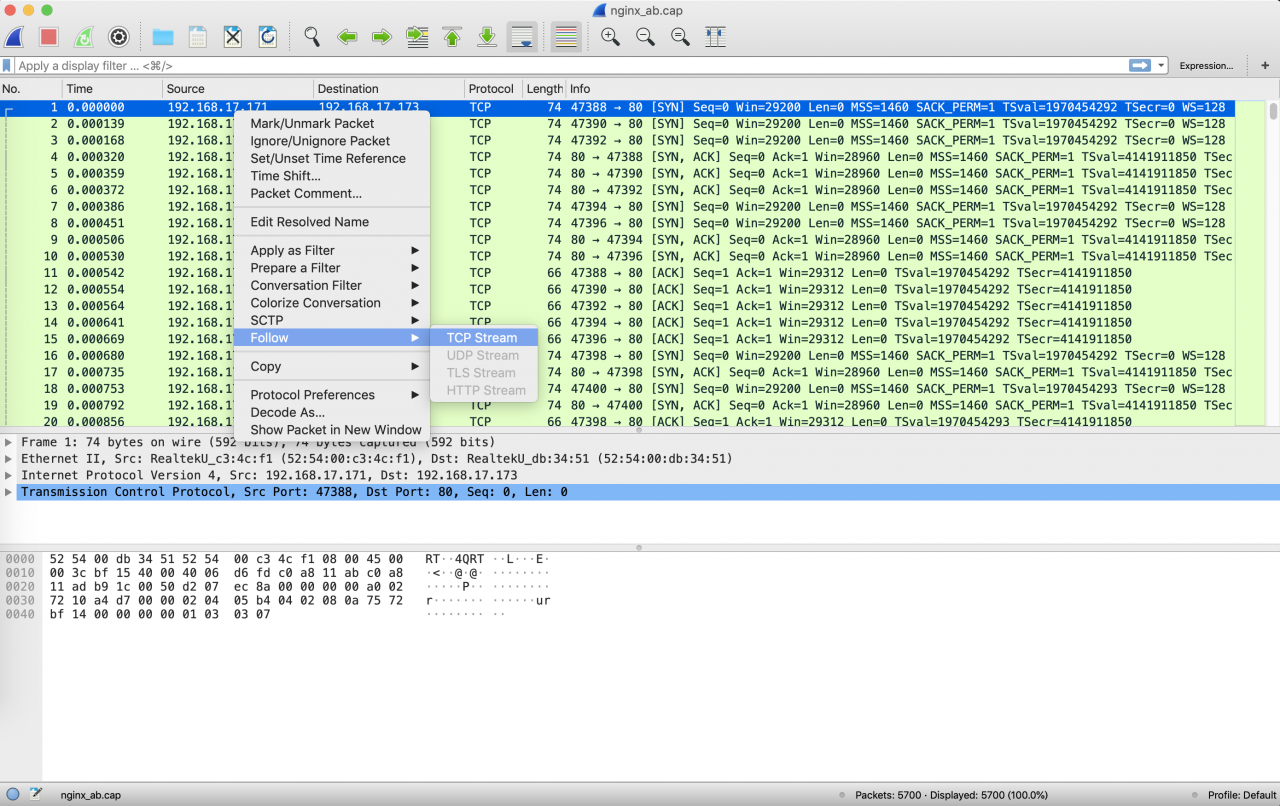
选择要分析的片段

● Linux中默认开启延迟确认。所谓延迟确认是指不是为每个请求都发送确认,而是等待一段时间,如果这段时间恰好有数据包要发送,那么就一起发送,否则就发送超时后分开。所以客户端会等待40ms才发送ack
● 由于nginx也设置了钉子算法,如果没有收到ack,就会等待数据包到达,所以会是这样的
( 1) 首先发送一个 http get 请求(包号 677)
(2) 发送 PSH, ACK (包号 999)
(3) 此时,由于 Linux 启用了延迟确认功能默认会等待40ms看是否有“顺风车”;并且由于nginx已经关闭了tcp_nodelay,所以也会等待ack的到来才响应
(4) 40ms后,不再等待“行程”,此时发送ack(包号1109)
(5) 收到确认后,发送 http 200(数据包编号 1118)
(6) 收到数据后,发送确认回执(数据包编号 1127)
:47388                        :80
     +-------+                                 +--------+
     |       |       no.677  http get          |        |
     |       +--------------------------------->        |
     |       |                                 |        |
     |       |       no.999  PSH,ACK           |        |
     |       <---------------------------------+        |
     |       |                                 |        |
     |       |                                 |        |
     |       |                                 |        |
     |       |          delay 40ms             |        |
     |       |                                 |        |
     |       |                                 |        |
     |       |                                 |        |
     |       |       no.1109  ACK              |        |
     |       +--------------------------------->        |
     |       |                                 |        |
     |       |       no.1118  http 200         |        |
     |       <---------------------------------+        |
     |       |                                 |        |
     |       |       no.1127  ACK              |        |
     |       +--------------------------------->        |
     |       |                                 |        |
     |       |                                 |        |
     +-------+                                 +--------+
4. 关闭
:49718                        :80
     +-------+                                 +--------+
     |       |       no.447  http get          |        |
     |       +--------------------------------->        |
     |       |                                 |        |
     |       |       no.740  PSH,ACK           |        |
     |       <---------------------------------+        |
     |       |                                 |        |
     |       |       no.741  http 200          |        |
     |       <---------------------------------+        |
     |       |                                 |        |
     |       |       no.742  ACK               |        |
     |       +--------------------------------->        |
     |       |                                 |        |
     |       |                                 |        |
     +-------+                                 +--------+
只需设置 tcp_nodelay;root@k8s-node2:/tmp# sed -i '/tcp_nodelay/s/off/on/g' nginx.conf
root@k8s-node2:/tmp# docker rm -f nginx_delay
nginx_delay
root@k8s-node2:/tmp# docker run -d --name nginx_delay -v /tmp/nginx.conf:/etc/nginx/nginx.conf -p 80:80 nginx:latest
bac9bcf7a6e392a7a07afae165c3d5b4e3fb2fc43d3470f35802e12d1e7ae70d
root@k8s-node2:/tmp# sed -i '/tcp_nodelay/s/off/on/g' nginx.conf
root@k8s-node2:/tmp# docker rm -f nginx_delay
nginx_delay
root@k8s-node2:/tmp# docker run -d --name nginx_delay -v /tmp/nginx.conf:/etc/nginx/nginx.conf -p 80:80 nginx:latest
bac9bcf7a6e392a7a07afae165c3d5b4e3fb2fc43d3470f35802e12d1e7ae70d
再次使用 ab 进行测试:
root@k8s-node2:~# ab -n 1000 -c 100 -k http://127.0.0.1/
This is ApacheBench, Version 2.3 <$Revision: 1807734 $>
Copyright 1996 Adam Twiss, Zeus Technology Ltd, http://www.zeustech.net/
Licensed to The Apache Software Foundation, http://www.apache.org/

...
Time per request:       14.285 [ms] (mean)
...
让我们再次查看抓包结果: 仍然处于开启状态,因为还没有客户端的确认时间。收到数据包后
● 但是 nginx , tcp_nodelay on,所以收到数据包后,会立即回复 ack
● 已经收到数据后,2 所以会立即发送 ack确认:
(1) 先发送http get请求(包号447)
(2) 收到后立即回复psh,ack(包号740) ♸ (3) 发送http 200(包号741)
(4)回复ack(包号742)
:49718                        :80
     +-------+                                 +--------+
     |       |       no.447  http get          |        |
     |       +--------------------------------->        |
     |       |                                 |        |
     |       |       no.740  PSH,ACK           |        |
     |       <---------------------------------+        |
     |       |                                 |        |
     |       |       no.741  http 200          |        |
     |       <---------------------------------+        |
     |       |                                 |        |
     |       |       no.742  ACK               |        |
     |       +--------------------------------->        |
     |       |                                 |        |
     |       |                                 |        |
     +-------+                                 +--------+
5.总结
●本文重现经典的40ms问题●ms术语在本文中提到,钉钉算法和延迟确认。他们非常相似。相似但不相同。Nagle算法必须等到peer ack到达或者收集到一个mss后才发送数据包;而延迟确认是为了ack,ack将等待“转弯”。如果有则轮流发送,否则等待超时。单独发送
● 本文中的延迟确认是Linux默认开启的功能,所以在实验中客户端会出现延迟确认的情况。要关闭客户端延迟确认,请在setsockopt中设置TCP_QUICKACK
● 本文主要讨论nginx的钉子算法。 Nagle算法完全由tcp协议的ack机制决定。如果对等方 ACK 响应速度很快,则 Stud 实际上不会拼接太多数据包。虽然避免了网络拥塞,但整体网络。使用率还很低
● 当钉钉算法与延迟确认交互时,会造成严重的延迟影响,需要警惕
● nginx 中是否启用钉钉算法取决于业务场景。例如,我们在实验中看到:
(1) tcp_nodelay off 会增加通信延迟,但会提高带宽利用率。在高延迟、大数据量通信场景下应该有不错的效果
(2)tcp_nodelay on会增加小包数量,但可以提高响应速度。在高时效通讯场景下应该有不错的效果
版权声明
本文仅代表作者观点,不代表Code前端网立场。
本文系作者Code前端网发表,如需转载,请注明页面地址。
