 code前端网
如何将nginx添加到系统服务并在centos中开机自动启动
如何将nginx服务添加到系统服务并在centos(linux)中开机自启动。首先来看看我安装的效果,截图如下!
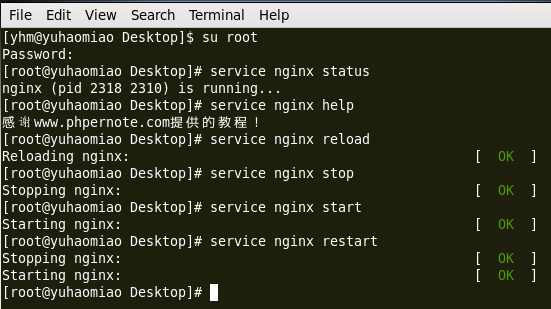
特殊方法如下:
1.首先编写一个shell脚本,脚本名称:nginx
vim /etc/init.d/nginx
输入以下内容:
#!/bin/bash
# nginx Startup script for the Nginx HTTP Server
# it is v.0.0.2 version.
# chkconfig: - 85 15
# description: Nginx is a high-performance web and proxy server.
# It has a lot of features, but it's not for everyone.
# processname: nginx
nginxd=/opt/nginx/sbin/nginx
nginx_config=/opt/nginx/conf/nginx.conf
nginx_pid=/var/run/nginx.pid
RETVAL=0
prog="nginx"
# Source function library.
. /etc/rc.d/init.d/functions
# Source networking configuration.
. /etc/sysconfig/network
# Check that networking is up.
[ ${NETWORKING} = "no" ] && exit 0
[ -x $nginxd ] || exit 0
# Start nginx daemons functions.
start() {
if [ -e $nginx_pid ];then
   echo "nginx already running...."
   exit 1
fi
   echo -n $"Starting $prog: "
   daemon $nginxd -c ${nginx_config}
   RETVAL=$?
   echo
   [ $RETVAL = 0 ] && touch /var/lock/subsys/nginx
   return $RETVAL
}
# Stop nginx daemons functions.
stop() {
        echo -n $"Stopping $prog: "
        killproc $nginxd
        RETVAL=$?
        echo
        [ $RETVAL = 0 ] && rm -f /var/lock/subsys/nginx /var/run/nginx.pid
}
# reload nginx service functions.
reload() {
    echo -n $"Reloading $prog: "
    #kill -HUP `cat ${nginx_pid}`
    killproc $nginxd -HUP
    RETVAL=$?
    echo
}
# See how we were called.
case "$1" in
start)
        start
        ;;
stop)
        stop
        ;;
reload)
        reload
        ;;
restart)
        stop
        start
        ;;
status)
        status $prog
        RETVAL=$?
        ;;
help)
        echo "感谢www.phpernote.com提供的教程!"
        ;;
*)
        echo $"Usage: $prog {start|stop|restart|reload|status|help}"
        exit 1
esac
exit $RETVAL

# 使用说明

# service nginx start 启动 nginx

# service nginx stop 停止 nginx

# service nginx reload 重新加载 nginx

# service nginx restart 先停止 nginx,再启动 nginx

# service nginx status 查看 nginx 服务状态

# service nginx help 查看 nginx 帮助
注意:上面代码中下面三行代码要替换为自己的相关信息,nginxd是可以找到的nginx启动文件的位置,nginx_config是可以通过
find / -name nginx.conf命令找到的nginx配置文件位置。
nginxd=/opt/nginx/sbin/nginx
nginx_config=/opt/nginx/conf/nginx.conf
nginx_pid=/var/run/nginx.pid
nginx_pid一般不需要被改变。
两个。保存上面的 shell 脚本,然后运行以下命令设置文件的可执行权限:
chmod +x /etc/rc.d/init.d/nginx 或 chmod 755 /etc/init.d/nginx
三。将nginx添加到系统服务
chkconfig --add nginx或chkconfig nginx on
网上还有其他方法,这里就不一一记录了。
版权声明
本文仅代表作者观点,不代表Code前端网立场。
本文系作者Code前端网发表,如需转载,请注明页面地址。
