code前端网
NumPy 教程:使用 Matplotlib 绘制直方图
NumPy 有一个函数 numpy.histogram(),它是数据频率分布的图形表示。水平尺寸相等的矩形对应于称为 bin 的类间隔,变量 height 对应于频率。函数
numpy.histogram()
numpy.histogram() 采用输入数组和 bin 作为两个参数。数组 bin 的连续元素用作每个 bin 的边界。
import numpy as np

a = np.array([22,87,5,43,56,73,55,54,11,20,51,5,79,31,27]) ]
np.histogram(a,bins =  [0,20,40,60,80,100])
hist,bins = np.histogram(a,bins =  [0,20,40,60,80,100])
print hist
print bins
输出为:
[3 4 5 2 1]
[0 20 40 60 80 100]
plt()
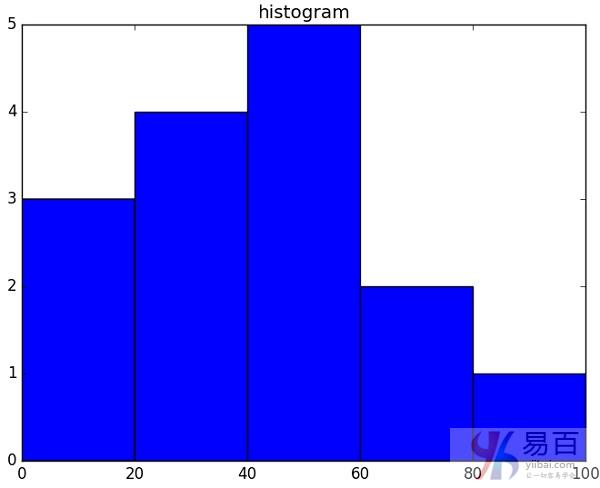
Matplotlib 可以将直方图转换为数值表示图。子模块 pyplot 的函数 plt() 将包含数据的数组和数组 bin 作为参数,并将其转换为直方图。
from matplotlib import pyplot as plt
import numpy as np

a = np.array([22,87,5,43,56,73,55,54,11,20,51,5,79,31,27])
plt.hist(a, bins =  [0,20,40,60,80,100])
plt.title("histogram")
plt.show()
输出为:
版权声明
本文仅代表作者观点,不代表Code前端网立场。
本文系作者Code前端网发表,如需转载,请注明页面地址。
相关文章