 code前端网
Centos 7源码安装LNMP环境三:PHP

Centos 7源码安装LNMP环境三PHP
扩展安装:
yum -y install libicu-devel openldap-develpcre pcre-developenssl openssl-devel gcc gcc-c++ autoconf automake ma ke libxml2 libxml2-devel openssl openssl-devel bzip2 bzip2-devel libcurl libcurl-devel libjpeg libjpeg-devel libpng libpng-devel freetype freetype-devel gmp gmp-devel libmcrypt libmcrypt-devel readline readline-devel libxslt libxslt-devel zlib zlib-devel
安装:
cd /src
wget https://www.php.net/distributions/php-7.3.5.tar.gz
 tar -zxvf php-7.3.5.tar.gz
cd php-7.3.5
./configure --prefix=/usr/local/php --with-config-file-path=/usr/local/php/etc --enable-fpm --with-fpm-user=www --with-fpm-group=www --enable-mysqlnd --with-mysqli=mysqlnd --with-pdo-mysql=mysqlnd --enable-mysqlnd-compression-support --with-iconv-dir --with-freetype-dir --with-jpeg-dir --with-png-dir --with-zlib --with-libxml-dir --enable-xml --disable-rpath --enable-bcmath --enable-shmop --enable-sysvsem --enable-inline-optimization --with-curl --enable-mbregex --enable-mbstring --enable-intl --enable-ftp --with-gd --enable-gd-jis-conv --with-openssl --with-mhash --enable-pcntl --enable-sockets --with-xmlrpc --enable-zip --enable-soap --with-gettext --disable-fileinfo --enable-opcache --with-pear --enable-maintainer-zts --with-ldap=shared --without-gdbm
make(此过程需花费时间较长)
make install
提示libzip的版本要求>=0.11
安装libzip:
wget https://nih.at/libzip/libzip-1.2.0.tar.gz
tar -zxvf libzip-1.2.0.tar.gz
cd libzip-1.2.0
./configure
make
make install
Bug修复:
错误:在/usr/lib中找不到ldap库
原因是动态链接库地址问题。
解决办法
具体解决办法如下:
cp -frp /usr/lib64/libldap* /usr/lib
error: off_t undefined;检查你的库配置
vim /etc/ld.so.conf
#添加以下行
 /usr/local/lib64
 /usr/local/lib
/usr/lib
/usr/lib64
 #保存退出
:wq
 ldconfig -v # 使之生效
usr/local/include/zip.h:59:21: fatal error: zipconf.h: 文件或目录不存在
找不到文件,添加zipconf.h软链接
cp /usr/local/lib/libzip/include/zipconf.h /usr/local/include/zipconf.h
将配置文件放在PHP包的解压文件夹中适当的位置(--在配置命令中用setting-config-file-path)
cp php.ini-development /etc/php.ini
设置活动帐户在:
所以:
cd php-fpm.d
cp www.conf.default www.conf(否则include匹配不到文件)
vim www.conf
搜索“用户”并设置活动帐户:
user=www-data
group=www-data
配置nginx支持php
vim /usr/local/nginx/conf/nginx.conf
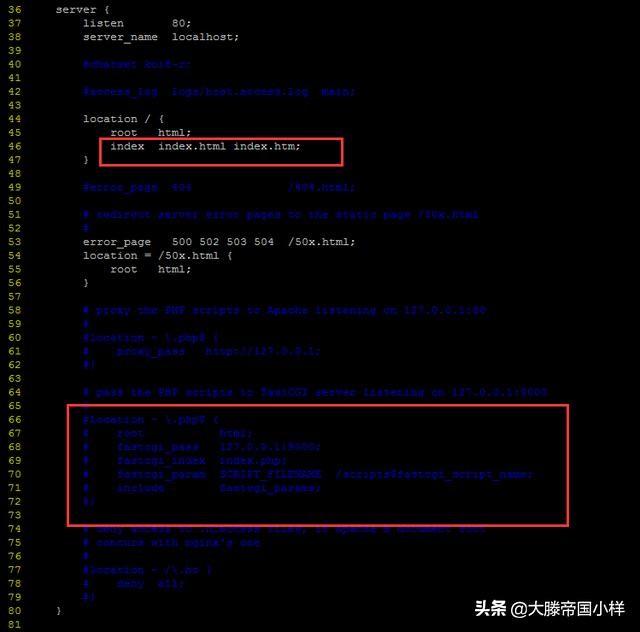
更改前
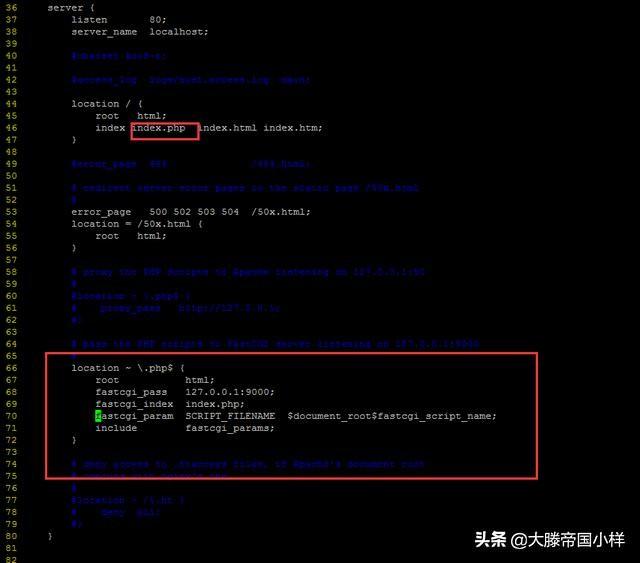
更改后
再次启动nginx服务更改后:
systemctl restart nginx.service
7。设置php-fpm为系统服务:
vim /etc/systemd/system/php-fpm.service
文件内容:
[Unit]
Description=php-fpm
After=network.target
[Service]
Type=forking
ExecStart=/usr/local/php/sbin/php-fpm
PrivateTmp=True
[Install]
WantedBy=multi-user.target
8.设置 php-fpm 服务在启动时自动启动:
systemctl enable php-fpm.service
9 。启动php-fpm:
systemctl start php-fpm.service
检查启动是否成功:
ps aux | grep php-fpm
10.编写PHP脚本,测试nginx是否支持PHP,PHP是否支持mysql。
<?php
phpinfo();
?>
至此,LNMP构建完成
版权声明
本文仅代表作者观点,不代表Code前端网立场。
本文系作者Code前端网发表,如需转载,请注明页面地址。
