code前端网
Python 数据结构教程:创建元素并向图表添加元素
图表是通过链接连接的一组对象的图形表示。相互连接的对象由称为顶点的点表示,连接顶点的链接称为边。这里详细描述了与图相关的各种术语和功能。在本章中,我们演示如何使用 python 程序创建图形并向其中添加各种数据元素。以下是在图表上执行的基本操作。
- 显示图形顶点
- 显示图形边缘
- 添加顶点
- 添加边缘
- 创建图形
使用字典的图形可能只是典型的。我们将顶点表示为字典键,将顶点之间的连接(也称为边界)表示为字典中的值。
参见下图 -
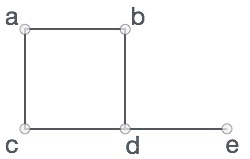
上图 -
V = {a, b, c, d, e}
E = {ab, ac, bd, cd, de}
该图可以在以下 python 程序中显示 -
# Create the dictionary with graph elements
graph = { "a" : ["b","c"],
          "b" : ["a", "d"],
          "c" : ["a", "d"],
          "d" : ["e"],
          "e" : ["d"]
         }

# Print the graph
print(graph)
Python
显示图的顶点
要显示图的顶点,只需使用 运行上面的示例代码,您将得到以下结果 - 显示图形边缘 查找图形边缘不太常见,因为您需要查找垂直边缘。每对顶点的顶点。因此创建一个空的边列表,然后迭代与每个顶点关联的边值。生成一个列表,其中包含在顶点中找到的不同边组。 添加顶点 添加顶点就像向图字典中添加另一个键一样简单。 运行上面的示例代码并获得以下结果 - 添加边 将边添加到现有图形涉及处理新顶点并检查边是否已存在。如果没有,则添加一条边。 运行上面的示例代码,你将得到以下结果 -keys() 方法在图字典中查找键即可。
Pythonclass graph:
def __init__(self,gdict=None):
if gdict is None:
gdict = []
self.gdict = gdict
# Get the keys of the dictionary
def getVertices(self):
return list(self.gdict.keys())
# Create the dictionary with graph elements
graph_elements = { "a" : ["b","c"],
"b" : ["a", "d"],
"c" : ["a", "d"],
"d" : ["e"],
"e" : ["d"]
}
g = graph(graph_elements)
print(g.getVertices())
Shell['a', 'b', 'c', 'd', 'e']
Shell[{'a', 'b'}, {'c', 'a'}, {'d', 'b'}, {'c', 'd'}, {'d', 'e'}]
Pythonclass graph:
def __init__(self,gdict=None):
if gdict is None:
gdict = {}
self.gdict = gdict
def getVertices(self):
return list(self.gdict.keys())
# Add the vertex as a key
def addVertex(self, vrtx):
if vrtx not in self.gdict:
self.gdict[vrtx] = []
# Create the dictionary with graph elements
graph_elements = { "a" : ["b","c"],
"b" : ["a", "d"],
"c" : ["a", "d"],
"d" : ["e"],
"e" : ["d"]
}
g = graph(graph_elements)
g.addVertex("f")
print(g.getVertices())
Shell['a', 'b', 'c', 'd', 'e', 'f']
Pythonclass graph:
def __init__(self,gdict=None):
if gdict is None:
gdict = {}
self.gdict = gdict
def edges(self):
return self.findedges()
# Add the new edge
def AddEdge(self, edge):
edge = set(edge)
(vrtx1, vrtx2) = tuple(edge)
if vrtx1 in self.gdict:
self.gdict[vrtx1].append(vrtx2)
else:
self.gdict[vrtx1] = [vrtx2]
# List the edge names
def findedges(self):
edgename = []
for vrtx in self.gdict:
for nxtvrtx in self.gdict[vrtx]:
if {nxtvrtx, vrtx} not in edgename:
edgename.append({vrtx, nxtvrtx})
return edgename
# Create the dictionary with graph elements
graph_elements = { "a" : ["b","c"],
"b" : ["a", "d"],
"c" : ["a", "d"],
"d" : ["e"],
"e" : ["d"]
}
g = graph(graph_elements)
g.AddEdge({'a','e'})
g.AddEdge({'a','c'})
print(g.edges())
[{'b', 'a'}, {'c', 'a'}, {'b', 'd'}, {'c', 'd'}, {'e', 'd'}, {'e', 'a'}]
版权声明
本文仅代表作者观点,不代表Code前端网立场。
本文系作者Code前端网发表,如需转载,请注明页面地址。